
If you’ve ever been surprised by a CNC machining quote, the reason is rarely the machine rate alone.
In reality, most CNC machining cost is decided long before a part ever reaches the shop floor—during design.
Small design decisions add up quickly. Tight tolerances on non-critical features, deep pockets that require long tools, or material choices that machine poorly can all drive cost up in ways that aren’t obvious in CAD. Two parts may look nearly identical on screen, yet one can cost 30–50% more to produce simply because it ignores basic Design for Manufacturability (DFM) principles.
Working closely with hardware teams, mechanical engineers, and sourcing professionals across North America and Europe, we see the same pattern again and again: the issue is rarely “expensive machining.” The real problem is designs that are unnecessarily difficult for machines to produce efficiently.
This guide focuses on practical, shop-floor-driven DFM strategies that help reduce CNC machining cost—without compromising performance, quality, or scalability.

What Design for Manufacturability (DFM) Really Means in CNC Machining
Design for Manufacturability (DFM) in CNC machining is not theoretical.
It simply means designing parts so that:
- Standard tools can be used
- Cutting forces remain stable
- Tool changes and setups are minimized
- Machining time is predictable
Predictability is what reduces cost.
At KaiSpeed CNC machining service, every uploaded CAD model receives a free DFM analysis reviewed by experienced manufacturing engineers—not just automated software checks. The goal is to identify where a design may look fine in CAD but becomes expensive once cutting starts.
10 Engineering-Driven DFM Tips to Reduce CNC Machining Cost
1. Keep Wall Thickness Uniform and Realistic
Thin walls are one of the fastest ways to increase CNC machining cost.
They vibrate, deflect, and force conservative cutting parameters.
Practical guidelines
- Metals: ≥ 0.8 mm
- Plastics: ≥ 1.5 mm
- Avoid abrupt wall thickness changes
From a machining standpoint, uniform walls allow stable cutting and reduce the need for multiple light finishing passes.
2. Control Pocket Depth Early in Design
Deep pockets fundamentally change how a part must be machined.
Once pocket depth exceeds roughly 3–4× the cutting tool diameter, rigidity drops sharply. Feed rates slow down, tool wear increases, and cycle time grows disproportionately.
KaiSpeed engineering insight
If a deep pocket is not functionally critical, redesign it. If it is required, consider splitting the geometry or leveraging KaiSpeed’s multi-axis CNC machining to reduce setups and improve tool access.
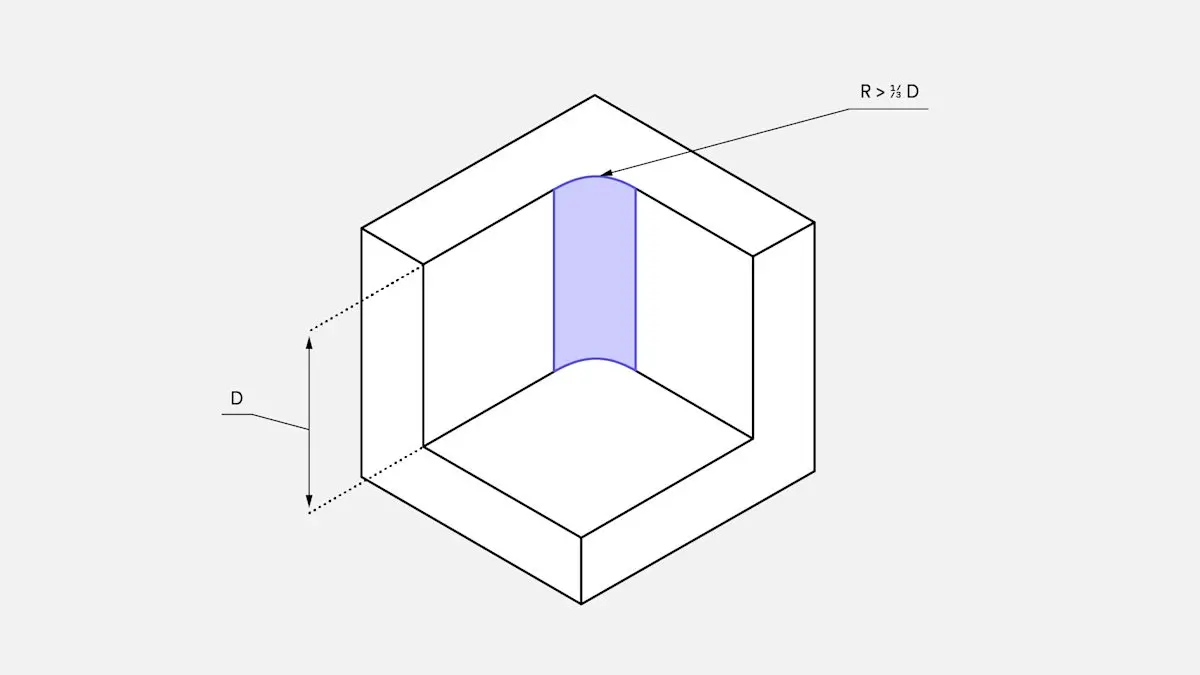
3. Design Internal Corners with Machining in Mind
Perfectly sharp internal corners do not exist in CNC machining.
They force the use of very small end mills, which increases machining time and tool breakage risk.
Cost-efficient approach
- Use internal radii larger than standard tool sizes
- 3 mm (metric) or 1/8” (imperial) works well for most designs
Larger radii allow stronger tools, faster feeds, and better surface finishes.
4. Standardize Hole Sizes Wherever Possible
Every unique hole diameter requires a tool change.
Tool changes are non-cutting time—and non-cutting time adds cost.
DFM best practice
- Use standard metric or imperial drill sizes
- Minimize the number of different hole diameters
📘 KaiSpeed maintains internal technical resources aligned with standard tooling libraries to streamline production.
5. Apply Tight Tolerances Only Where Functionally Necessary
This is one of the most common cost drivers we see.
From a machining perspective, the jump from ±0.1 mm to ±0.01 mm is not incremental—it is exponential. It often requires slower feeds, additional finishing passes, controlled environments, and more inspection time.
Rule of thumb
If a tolerance does not directly affect fit, function, or performance, it should not be tight.
📌 For real-world implications, see our CNC machining tolerances guide.
6. Design Around Standard Material Stock Sizes
CNC machining almost always starts from standard stock.
Designs that fall outside common thicknesses and widths create unnecessary material waste.
Example
A 52 mm thick part typically requires 55 mm stock, increasing raw material cost.
👉 Reference KaiSpeed’s material selection page to align designs with readily available stock sizes.
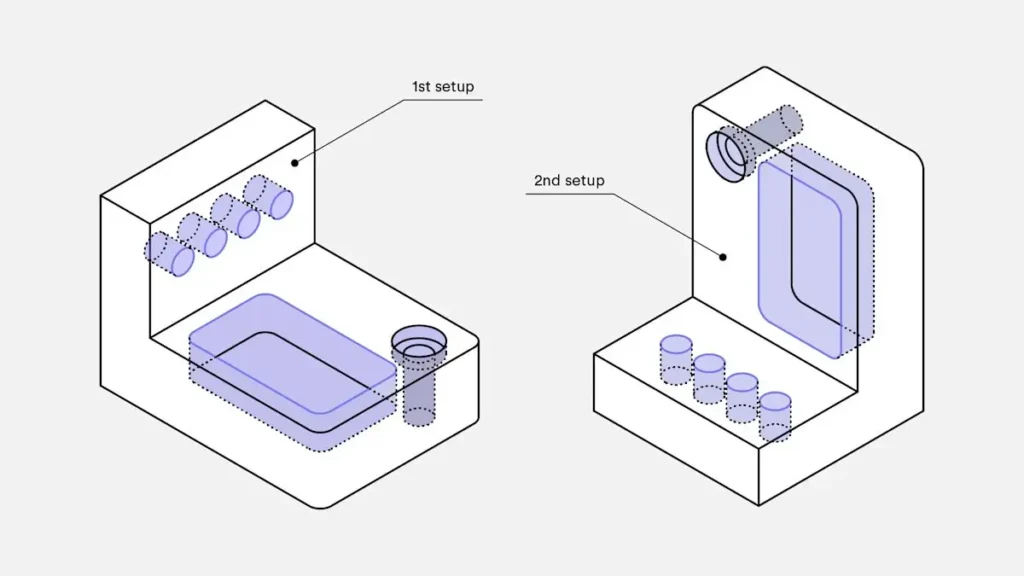
7. Reduce Setups and Re-Fixturing
Each setup introduces time, labor, and alignment risk.
Parts requiring machining on many sides often cost more than expected—not because they are complex, but because they require repeated re-fixturing.
Design goal
- Limit machining to 2–3 setups
- Improve feature accessibility from common orientations
KaiSpeed’s advanced 5-axis CNC machines often consolidate multiple operations into a single setup, significantly reducing total machining time.
8. Simplify Text, Logos, and Cosmetic Details
Deep engraving and small fonts require tiny tools and slow feeds.
Lower-cost alternatives
- Raised (embossed) text instead of engraved
- Simple sans-serif fonts
- Shallow engraving depths
Provide clean vector files (DXF, SVG) to avoid interpretation errors during programming.
9. Avoid Undercuts Unless Absolutely Necessary
Undercuts often require special tooling or EDM, both of which increase cost and lead time.
DFM-friendly options
- Use standard T-slots or dovetail features
- Eliminate hidden internal geometry when possible
KaiSpeed’s instant quoting platform automatically flags undercuts during DFM review so issues are addressed early.
10. Choose Materials Based on Machinability, Not Just Strength
Material choice directly affects machining time.
| Material | Machinability | Relative Cost Impact |
|---|---|---|
| 6061 Aluminum | Excellent | Low |
| Stainless Steel | Moderate | Medium |
| Inconel 718 | Poor | Very High |
High-performance alloys should be used only when necessary. For prototypes and early-stage builds, easy-to-machine materials significantly reduce CNC machining cost.
📌 See our material comparison guide for engineering-based selection advice.
DFM Summary: Design Choices That Directly Impact CNC Cost
| Design Area | Costly Choice | Optimized Choice | Cost Benefit |
|---|---|---|---|
| Wall Thickness | Thin / inconsistent | Uniform ≥0.8 mm | Stable cutting |
| Corners | Sharp internal edges | Large radii | Faster feeds |
| Tolerances | Tight everywhere | Critical only | Less inspection |
| Holes | Custom sizes | Standard drills | Fewer tool changes |
| Material | Exotic alloys | Standard stock | Shorter cycle time |
How KaiSpeed Integrates DFM into Every CNC Quote
At KaiSpeed, DFM is not an afterthought—it is part of the quoting process.
When you upload a CAD file to KaiSpeed’s instant quoting platform:
- Potential cost drivers are flagged automatically
- Manufacturing engineers review the design
- Optimization suggestions are shared before production
- Pricing reflects real, manufacturable conditions
This approach prevents late-stage redesigns, unexpected cost increases, and production delays—especially critical for hardware teams moving from prototype to low-volume production.
👉 Learn more about our precision machining services and production workflow.
Conclusion: The Most Effective Way to Reduce CNC Machining Cost Is Better Design
CNC machining cost is not primarily driven by hourly rates or geography—it is driven by how easily a design can be machined.
By applying DFM principles early, engineering teams gain:
- Shorter lead times
- More predictable pricing
- Fewer design revisions
- Smoother transitions from prototype to production
Smart design decisions upstream consistently outperform cost-cutting attempts downstream.
Call to Action: Get a Free DFM Review from KaiSpeed
If you’re unsure whether your design is truly optimized for CNC machining, a DFM review is the fastest way to find out.
Upload your CAD file to KaiSpeed and receive a free, engineer-reviewed DFM analysis identifying real cost drivers and practical optimization opportunities—before production begins.